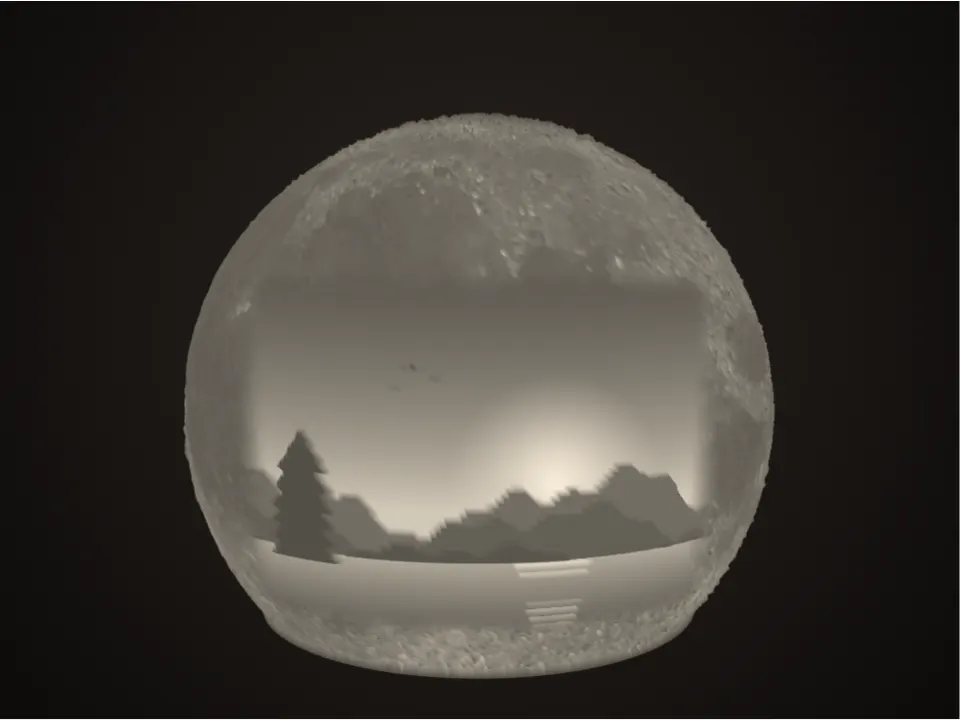
How to make a photo moon lamp
- Choose a photo. A face, a couple or a family photo with a clear subject works best. Crop it tightly first.
- Set the photo width and moon size. 100–120 mm is a good desk lamp; up to 200 mm for a statement piece.
- Pick a stand or hanging. On a stand, an LED tea light or USB puck sits underneath. Hanging, a pendant lamp holder holds the moon from the top.
- Check the backlit preview, adjust brightness and contrast, then download the moon and its stand (or cap).
- Print in white PLA with 100% infill and 0.12–0.16 mm layers, as exported. No supports at the default settings.
A real moon, with your photo on it
The sphere is a hollow lithophane: thin where the Moon is bright and thick in the dark seas, so it glows like a full moon when lit from inside. The surface comes from NASA's Moon 3D model, with the familiar near side facing you. Your photo is projected onto the front so it looks undistorted when you face the lamp, and its edges fade softly into the craters. It makes a lovely birthday, anniversary or memorial gift.
- Size: 70–200 mm. The stand fits a 38 mm LED tea light at the default settings, and USB LED pucks up to the size shown in the stats.
- Rounder moon: raise the Base cut-off for a smaller opening. Above 135° the lowest band overhangs more than 45°.
- The stand: any colour, normal settings. A dark or wood-fill stand looks great under a white moon, and there is an optional slot for a USB cable.
- Light: LED only. Warm white looks most like moonlight; colour-changing LEDs work too.
Hanging moon
Choose Hanging for a full moon to hang from the ceiling. The big piece has a hole on top for a pendant lamp holder, and a cap closes the bottom with twelve snap fingers that click into a collar inside the moon. Thread the cord through the top, clamp the moon with the holder's shade ring, screw in the bulb from below, then press the cap on.
- Hole: measure your lamp holder's threaded part (about 40 mm for E27/E26, 28 mm for E14).
- Bulb: a small LED bulb only (3–5 W, warm white), such as a G45 globe or a candle bulb. Never incandescent or halogen.
- Printing: both pieces as exported with 100% infill and a brim; the cap stands upside down on its fingers.
Recommended print settings
| Setting | Moon | Stand |
|---|---|---|
| Material | Plain white PLA (or white PETG) | Any |
| Orientation | As exported, opening down | As exported |
| Layer height | 0.12–0.16 mm | 0.2 mm |
| Infill | 100% | 15–20% |
| Supports | None (default cut-off) | None |
Want a flat photo panel, a curved frame, a lamp shade or a keychain instead? Use the full Lithophane Maker.
Moon surface: NASA's Moon 3D model (solarsystem.nasa.gov), reprojected for printing.
Frequently asked questions
Is the moon lamp generator free?
Yes. Make and download as many moon lamp STL files as you like, with or without your photo. No account is needed, and your photo never leaves your device.
Can I put my own photo on the moon lamp?
Yes. Keep "Put my photo on the moon" ticked and choose your photo. It is placed on the front of the moon and fades into the craters around it; set its width with the Photo width slider. Untick it for a plain moon.
Is it the real moon surface?
Yes. The surface comes from NASA's Moon 3D model, so the seas, craters and rays are where they are on the real Moon, with the familiar near side facing you.
How do I print the moon lamp?
Download the moon and the stand as two files. Print the moon as exported (opening down) in white PLA with 100% infill, 0.12–0.16 mm layers and no supports: at the default 135° base cut-off the outside never overhangs more than 45° and the inside dome closes on its own. The stand prints with normal settings.
Can I make the moon rounder?
Yes. Raise the Base cut-off slider. The opening gets smaller and the moon rounder, but the lowest band overhangs more (50° at 140°, 60° at 150°). Most printers manage about 55°; beyond that, add supports touching the build plate only.
Can I make a hanging moon lamp?
Yes. Choose Hanging. You get a full moon in two pieces: the big piece hangs from a pendant lamp holder through a hole on top, and a snap-on cap closes the bottom so you can fit and change the bulb. Use a small LED bulb only.
What light should I use?
LED only. A 38 mm battery LED tea light or a USB LED puck fits the stand; a small 3–5 W LED bulb suits the hanging moon. Never use a candle, incandescent or halogen bulb: PLA softens around 55 °C.